
The year 2026 is here, and Salesforce is all set to revolutionize the way businesses innovate and operate with its groundbreaking Spring ’26 release.
This highly anticipated update is packed with a suite of powerful tools and intelligent enhancements designed to elevate productivity, fortify security, and unlock new levels of efficiency for Salesforce Admins and Developers.
Whether you’re collaborating with a seasoned Salesforce consulting company or spearheading your own Salesforce application development projects, these top 10 Spring ’26 features are poised to transform how you streamline automation, enhance data governance, and create seamless, intuitive user experiences that drive business success.
Top Features for Salesforce Developers in Spring ’26 Release
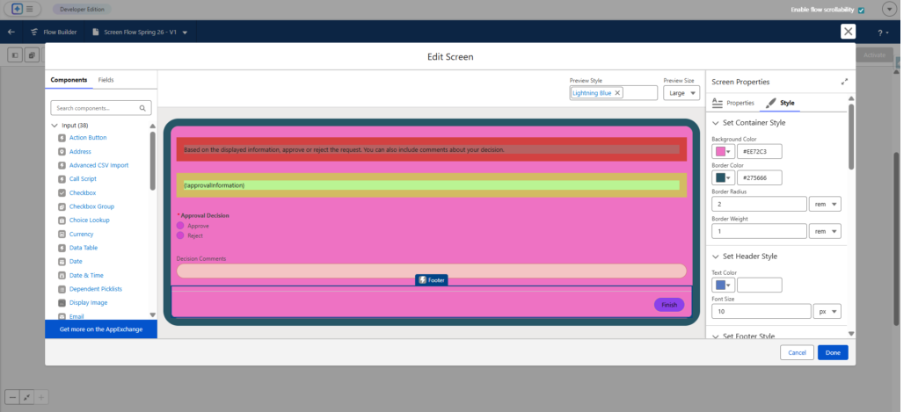
1. Advanced Flow Building Components and Multi-Page Experiences
Developers can now integrate new Flow components such as Kanban boards and editable data tables to create more interactive and user-friendly multi-step applications.
These upgrades empower developers to deliver richer interfaces without heavy coding, accelerating Salesforce application development cycles.
2. Lightning Web Components (LWC) Upgrade with SLDS 2 and TypeScript Support
Spring ’26 brings the latest Salesforce Lightning Design System (SLDS) 2, improving UI consistency and performance.
TypeScript support continues to mature with new npm packages for importing type definitions, helping developers catch bugs early and enforce better coding standards.
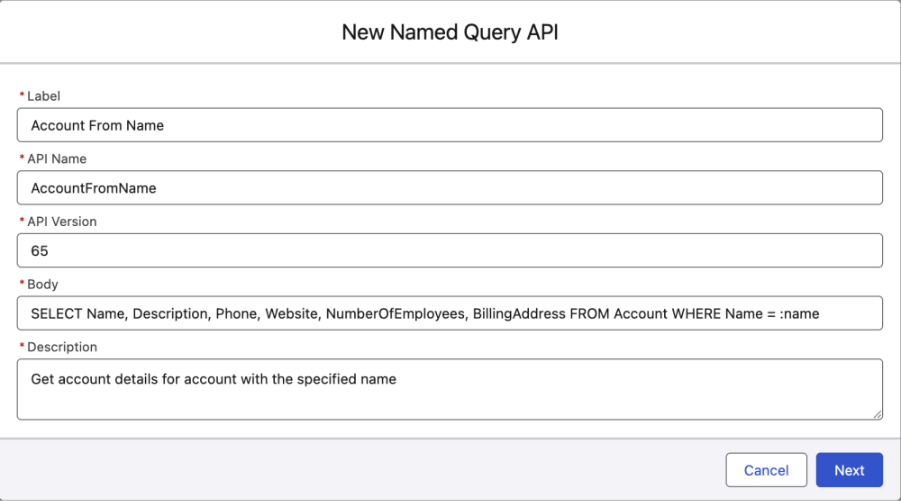
3. Named Query API for Invoking Predefined SOQL Queries
Developers now can create and expose reusable SOQL queries via the new Named Query API, which allows testing and invoking queries through API calls without writing Apex.
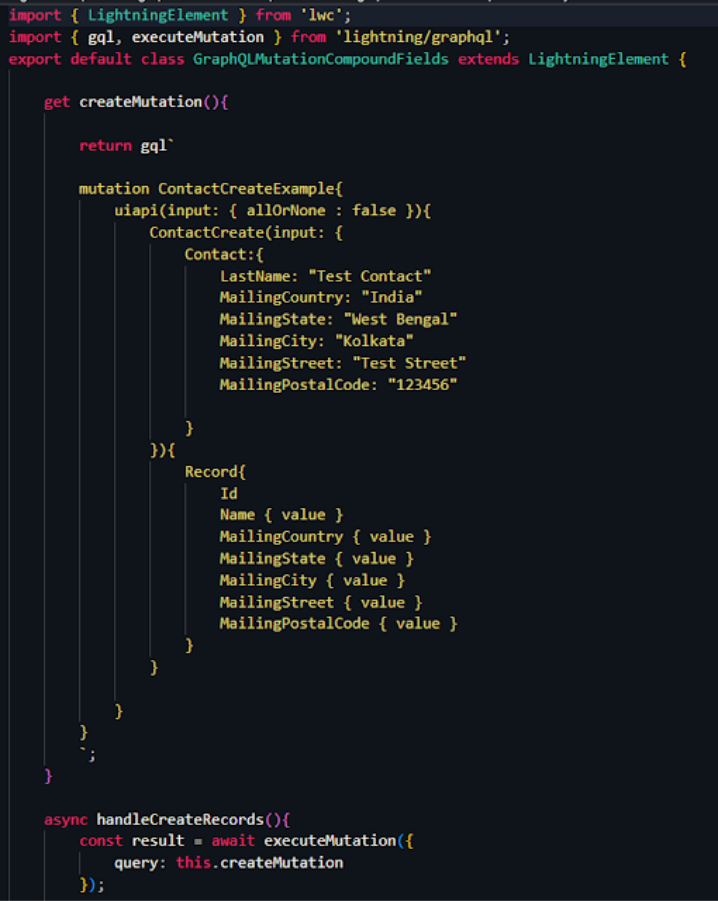
4. GraphQL Mutations in LWCs
The GraphQL API now supports mutation operations in Lightning Web Components, enabling client-side components to perform data changes without relying on Apex controllers.
5. Apex Cursor Class for Efficient Querying
The new Cursor class in Apex facilitates creating cached queries with fine-grained access control, enhancing asynchronous Apex jobs and batch processing, offering developers more power to optimize large data volume handling.
6. Relevant Tests Beta to Reduce Test Run Size
To speed up deployment in large orgs, the Relevant Tests feature (in beta) runs only the Apex tests affected by code changes, reducing CI/CD cycle times and increasing developer productivity.
7. Complex Expressions Support in LWC Templates (Beta)
LWC templates can now handle a broader range of JavaScript expressions, enabling developers to build more dynamic UI elements directly in templates.
8. LWC Discoverability by Agentforce for Setup
Developers can make their LWCs discoverable and manageable through the AI-driven Agentforce setup assistant by adding descriptive metadata, increasing component adoption and easing configuration.
9. Enhanced Security Measures: No Session ID in Outbound Messages
As part of Salesforce’s tightening security, session IDs will no longer be sent with outbound messages, prompting developers to revisit and update legacy integrations for safer data exchange.
10. Disabled Default Creation of Connected Apps
To curb security risks, Spring ’26 disables new Connected App creation by default, requiring explicit admin approval—encouraging developers to adopt stricter governance in application integration practices.
Top Features for Salesforce Admins in Spring ’26 Release
1. Smarter Flow Automation with Per-Flow Logging & Kanban Components
Empower admins with enhanced Flow automation, detailed per-Flow logging, and visual Kanban components for smoother process management.
- Per-Flow logging connected to Salesforce Data Cloud for precise tracking.
- New Kanban boards to visualize records within Flows.
- Editable data tables enable inline record updates inside Flows.
2. Enhanced Permission Controls for File Deletion
Grant precise file deletion rights with a new granular permission, improving security.
- New Delete Salesforce Files permission for controlled file deletion.
- Extends rights beyond file owners and full admins.
- Supports least-privilege access models for better governance.
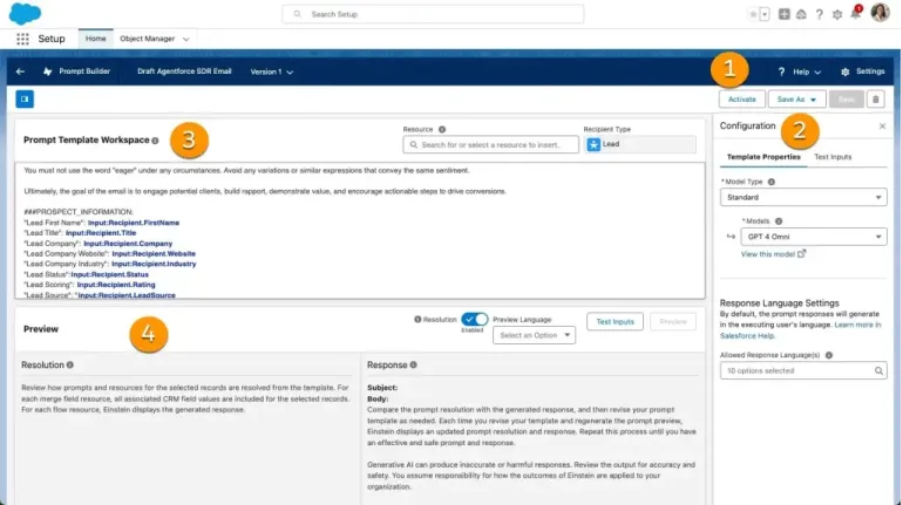
3. Setup with Agentforce (Beta) – Your AI-Powered Assistant
An AI assistant embedded in Setup guides admins with natural language commands, streamlining configuration tasks.
- AI-driven contextual help within Setup interface.
- Reduces toggling between docs and Setup pages.
- Boosts admin efficiency and speeds adoption.
4. Centralized Error Console for Lightning Experience
A single dashboard surfaces silent and non-fatal errors in Lightning, enabling proactive issue detection and faster resolution.
- Aggregates page-level errors in one place.
- Highlights errors often missed by users.
- Helps reduce downtime and user frustration.
5. Dynamic Forms Expansion and List View Improvements
Improved Dynamic Forms and smarter list view editing optimize data accuracy and reduce admin workload.
- Expanded Dynamic Forms customization options.
- Inline editing capped at 200 records upfront to avoid save errors.
- Improved sorting treats blanks as highest in descending order.
6. Salesforce My Trust Center (Beta) for Org Health Visibility
A unified portal offers admins transparent insights into org health, incident history, and platform reliability.
- Consolidates service health, maintenance, and org location data.
- Allows subscription to tenant-specific notifications.
- Enhances transparency and proactive management.
7. Request Approval Lightning Component for Flow-Based Approvals
Users can submit approval requests directly from record pages, with inline approver selection and comments to speed workflows.
- Simplifies submission for Flow-based approvals.
- Admin-configurable approver selection and comments.
- Encourages migration from legacy approval processes.
8. Retain Report Table Settings in Dashboards
Dashboards now support report table configurations, ensuring consistent data presentation with less admin effort.
- Automatically keeps dashboards aligned with report settings.
- Enhances reliability and reduces maintenance.
- Improves business data accuracy.
9. Improved Report Sharing with Username Precision & Export Disclaimers
Enhanced sharing shows precise usernames for access control and allows adding custom export disclaimers for compliance.
- Displays full usernames for accurate sharing assignments.
- Supports appending custom disclaimers on exported reports.
- Maintains Salesforce’s default confidentiality notice.
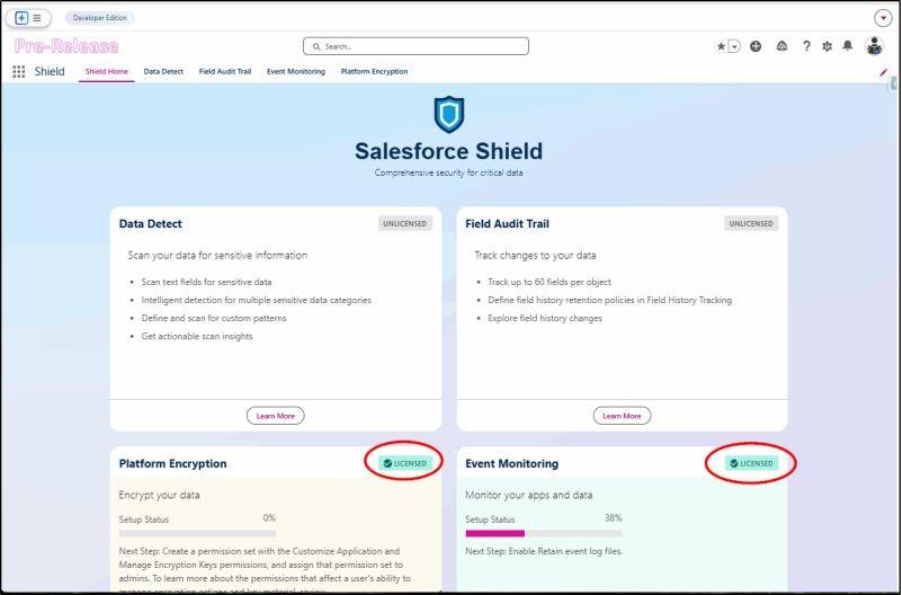
10. Dedicated Shield Experience App
A centralized app consolidates Shield security tools for streamlined governance and easier monitoring of sensitive data.
- Combines Data Detect, Field Audit Trail, Platform Encryption, Event Monitoring.
- Simplifies access to security and compliance features.
- Supports robust data protection management.
How to Get Started with Spring ’26 Features Adoption
- Conduct Early Testing: Use sandbox environments to explore new Flow components, security permissions, and developer features.
- Train Admins and Developers: Equip your teams with knowledge of AI-powered tools like Setup with Agentforce and the Error Console.
- Review Security Policies: Update file deletion permissions and Connected App policies to align with the new capabilities.
- Optimize Data Strategy: Leverage Data Cloud enhancements and zero-copy connectors to streamline integrations.
- Leverage Expert Support: Collaborate with a Salesforce consulting company to design tailored adoption roadmaps and avoid common pitfalls.
The Salesforce Spring ’26 release is packed with innovations tailored for both admins and developers. From AI-powered setup assistants to advanced Flow components and next-gen LWC capabilities, the new release offers measurable improvements & upgrades in productivity, security, and user experience.
If you’re ready to future-proof your Salesforce org, consider hiring a Salesforce consulting partner, map out your adoption strategy, and dive into these powerful new features that will define your 2026 success.
Need assistance with understanding & make the most out of Salesforce Spring ’26 release features? Connect with a trusted Salesforce consulting company like Cloud Analogy to unlock seamless Salesforce application development & Salesforce release management tailored to your business needs.