In a world where business moves quickly, maintaining strong, connected communication between teams and customers is key.
Organizations rely heavily on virtual meetings, CRM insights, automated workflows, and centralized data access to maintain meaningful engagement. Zoho Meeting and HubSpot are two platforms that enable this workflow—Zoho Meeting as a robust web conferencing tool, and HubSpot as a leading CRM for sales, marketing, and customer service.
Individually, these platforms are powerful. But when integrated, they provide an exceptional end-to-end experience in which meetings, contacts, and CRM activities come together in one ecosystem. Whether you’re running demos, onboarding sessions, customer support calls, or sales consultations, the Zoho Meeting–HubSpot integration ensures that every interaction is recorded, tracked, and actionable.
This guide explains why the integration matters, its key benefits and features, and how to set it up step-by-step for your business.
Introduction to Zoho Meeting & HubSpot
What is Zoho Meeting?
Zoho Meeting is a secure video conferencing and webinar platform designed for businesses of all sizes. It enables virtual meetings, screen sharing, webinar hosting, audience engagement, and detailed analytics—all wrapped in an easy-to-use cloud interface. With its strong emphasis on security, collaboration, and automated workflows, Zoho Meeting is widely used across sales teams, customer support, HR, and training functions.
What is HubSpot?
HubSpot is a leading CRM platform offering tools across marketing, sales, service, and automation. Its intuitive interface and strong ecosystem help companies manage customer data, streamline pipelines, automate communication, and track engagement throughout the customer lifecycle. HubSpot acts as the single source of truth for contact records, deal progress, support tickets, and analytics.
Why Integrate Zoho Meeting with HubSpot?
Connecting Zoho Meeting to HubSpot helps businesses eliminate manual data entry, reduce context switching, and maintain a single source of truth for every customer interaction. Here’s why the integration is so impactful:
- Unified Meeting & CRM Data: Your team no longer needs to switch between multiple apps to track who attended a meeting, what was discussed, or what actions followed. All meeting data flows directly into HubSpot records.
- Automated Contact Enrichment: Every meeting participant is automatically added to HubSpot as a contact, helping you maintain a complete, up-to-date database with minimal manual effort.
- Enhanced Customer Journey Visibility: Sales, marketing, and support teams gain a complete timeline of meetings, notes, recordings, and follow-up tasks mapped to contacts, companies, deals, or tickets.
- Consistency Across Teams: Whether it’s sales closing deals, marketing hosting webinars, or support offering troubleshooting sessions, all teams work off the same synchronized information.
- Better Engagement Tracking: Engagement metrics—attendance, participation, and transcripts—are stored directly within HubSpot, allowing deeper insights for nurturing and decision-making.
- Improved Productivity and Collaboration: Teams no longer need to switch between tools or depend on scattered meeting notes. Everything is stored right where it matters—the CRM.
Key Features of Zoho Meeting HubSpot Integration
The Zoho Meeting–HubSpot integration offers a powerful set of features designed to streamline your processes:
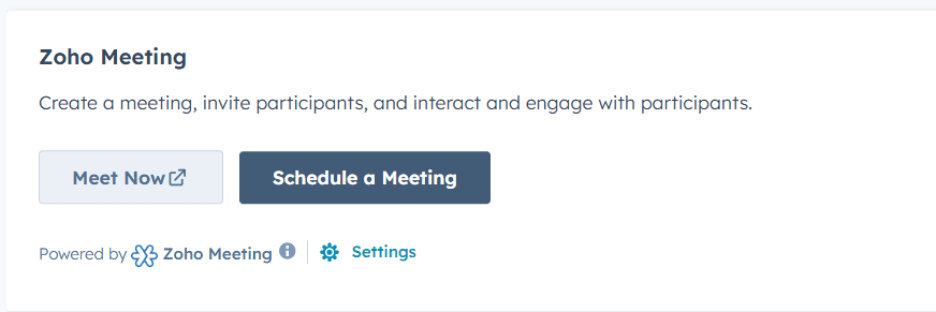
1. Schedule and Start Meetings from HubSpot – Create instant meetings or schedule future sessions directly from HubSpot’s contact, company, deal, or ticket records.
2. App Cards for Quick Insights – An App Card within HubSpot records displays meeting information such as:
- Upcoming meetings
- Past sessions
- Duration
- Attendance
- Engagement scores
This helps teams understand customer activity at a glance.
3. Meeting History in CRM Timeline
All meeting interactions appear in the HubSpot timeline, allowing users to track communication history without toggling between platforms.
4. Sync Recordings, Notes, and Transcripts
Zoho Meeting automatically stores recordings, chat transcripts, summaries, and engagement details inside the corresponding HubSpot record under Notes.
5. Automatic Contact Creation
Anyone who joins a meeting becomes a contact in HubSpot (if they aren’t already), complete with enriched activity data.
6. Data Association with Deals, Tickets, and Companies
Meeting insights are linked to relevant CRM objects, giving a holistic view of progress across pipelines and support cases.
Step-by-Step Guide: How to Integrate Zoho Meeting with HubSpot
Step 1: Log in to Zoho Meeting: Sign in to your Zoho Meeting account using an administrator account to ensure you have access to the integration settings.
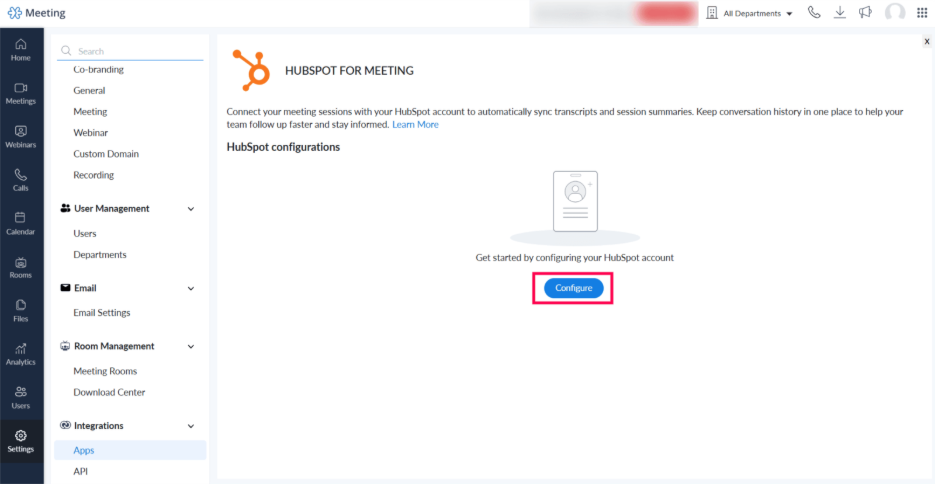
Step 2: Navigate to Settings: From the left-side navigation menu in Zoho Meeting:
Settings → Integrations → Apps
Here, you’ll find the list of third-party apps available for integration.
Step 3: Select HubSpot Integration
Click HubSpot for Meetings in the list of available connectors. Then select Configure or Connect.
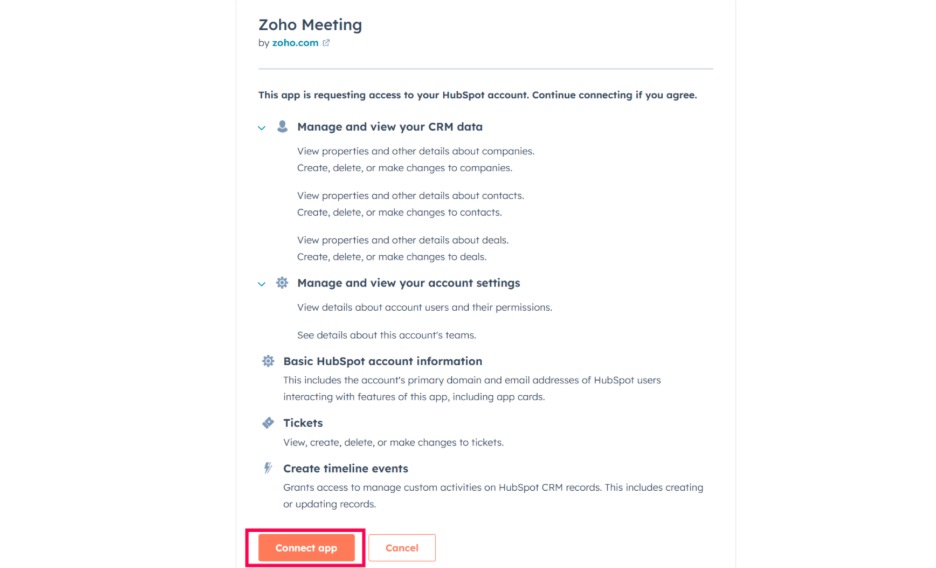
Step 4: Authorize HubSpot Access
You will be redirected to HubSpot’s login window. Enter your credentials and choose the HubSpot account you want to integrate.
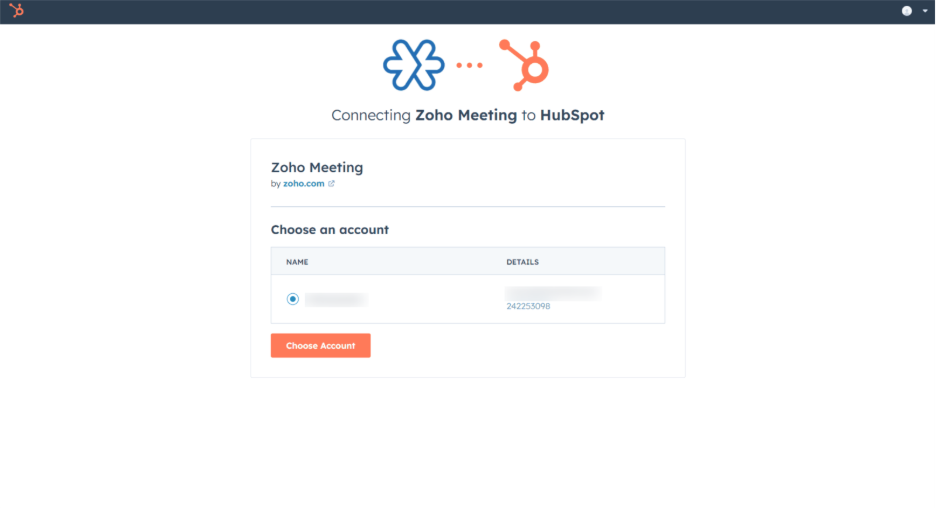
HubSpot will ask for permission to:
- Read and write CRM records
- Sync contact data
- Create timeline events
- Access base-level CRM objects
- Review the permissions and click Allow/Connect
Step 5: Confirm Successful Configuration
After authentication, you’ll be redirected back to Zoho Meeting. A confirmation message indicates the integration is active.
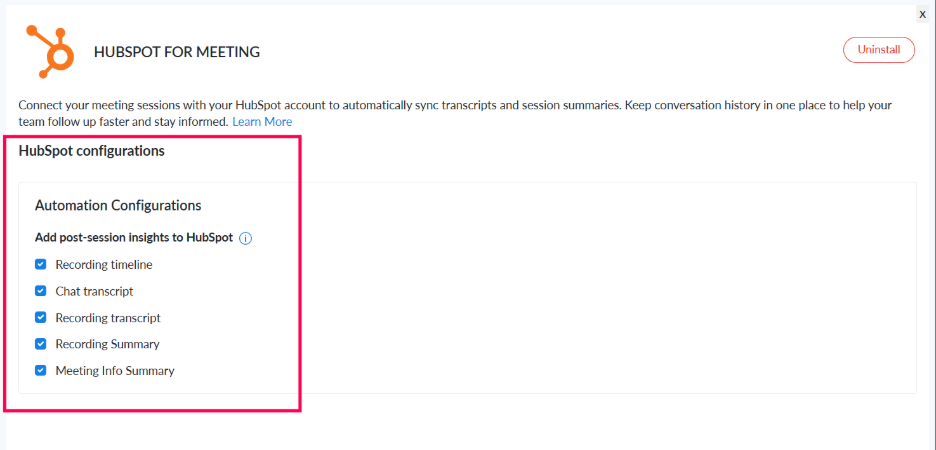
Step 6: Configure Sync Settings (Optional but Recommended)
Zoho Meeting allows you to customize sync preferences, such as:
- Enable integration for all upcoming meetings by default.
- Automatically add registrants as HubSpot contacts.
- Map meeting data to specific HubSpot fields.
- Turn on/off automatic transcript syncing.
- Choose whether to log only completed sessions.
Adjust settings based on your team workflow to ensure seamless data flow.
Step 7: Test the Integration
Schedule a test meeting and confirm that:
- The meeting appears in HubSpot
- Participants sync correctly
- Recordings and transcripts are attached to the correct record.
- Timeline events show up as expected.
Once validated, the integration is ready for team-wide use.
Benefits You Unlock After Integration
1. Centralized Meeting Management – All meeting activity, including summaries and attendance analytics, appears within HubSpot.
2. Enhanced Follow-Ups – Sales reps and customer support agents get contextual insights, helping them tailor follow-ups based on what was discussed.
3. Accurate Analytics and Reporting – Combining Zoho Meeting engagement data with HubSpot CRM analytics gives you a holistic view of customer interactions.
4. Collaboration Without Chaos – Teams access the same set of insights, eliminating fragmented reporting and missed details.
5. Scalable Data Automation – As your business grows, the integration ensures all meeting interactions scale with clean, structured CRM data.
Final Wrap
Integrating Zoho Meeting with HubSpot unlocks a powerful, automated ecosystem that brings communication, insights, and CRM workflows together. With centralized meeting data, accurate activity timelines, and effortless collaboration, teams can work smarter, close deals faster, and deliver exceptional customer experiences.
Whether you’re organizing demos, onboarding new clients, running internal reviews, or offering customer support, the Zoho Meeting–HubSpot integration keeps your teams aligned and informed—boosting productivity and creating stronger, more personalized customer relationships.