
Sharing is caring!
Artificial Intelligence is one of the biggest technology revolutions of our time, and it’s not slowing down anytime soon. From helping teams work faster to improving customer experiences, AI has quickly become a daily business companion. However, adopting AI is only half the battle. The real challenge lies in enabling AI to work seamlessly and securely with existing business systems like Salesforce without creating multiple custom integrations.
This is where the Model Context Protocol (MCP) makes a difference. It provides a standardized way for AI applications to communicate with enterprise platforms like Salesforce while maintaining security, governance, and scalability.
Whether you’re planning your AI roadmap or looking for a trusted Salesforce consulting partner, understanding Salesforce MCP integration can help your business build scalable, secure, and future-ready AI solutions.
What is Salesforce MCP Integration?
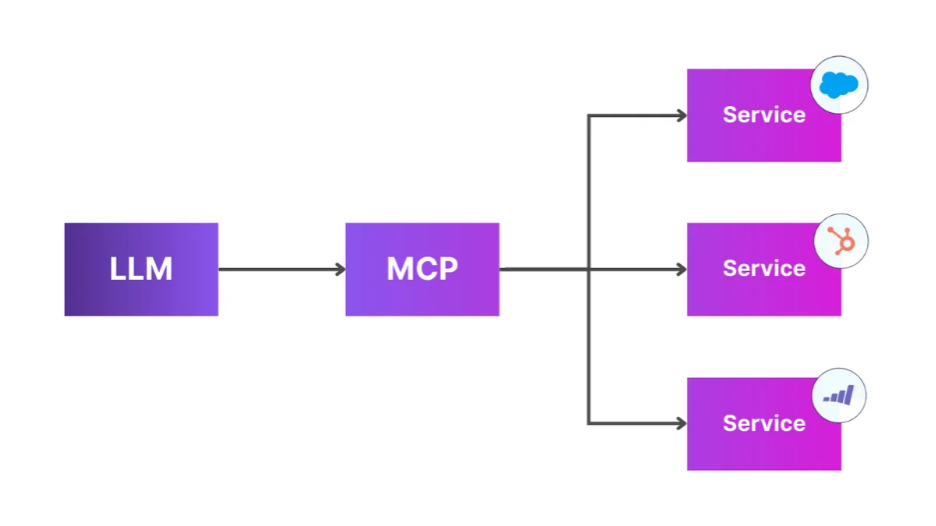
Salesforce MCP Integration connects Salesforce with AI assistants using the Model Context Protocol. Instead of building separate integrations for every AI platform, businesses create a single MCP server that securely connects Salesforce with multiple AI applications.
This approach allows AI assistants to:
- Retrieve Salesforce data
- Update CRM records
- Execute approved business actions
- Trigger workflows
- Access custom APIs
- Support users with real-time business information
The biggest advantage is that organizations only build the integration once and can use it with different AI platforms that support MCP.
What is the Model Context Protocol?
MCP is an open protocol that standardizes communication between AI models and external tools, APIs, databases, and enterprise platforms. Instead of every AI provider requiring its own custom integration, MCP creates one standardized connection that works across multiple AI tools.
With MCP, AI assistants can securely:
- Access enterprise applications
- Retrieve business information
- Execute approved actions
- Connect with APIs
- Use custom business tools
- Maintain secure communication

Why Does Salesforce Need MCP?
Salesforce stores some of the most valuable business information, including:
- Accounts
- Contacts
- Opportunities
- Leads
- Cases
- Custom Objects
- Reports
- Dashboards
Traditionally, connecting AI with Salesforce required developers to create custom REST APIs, configure OAuth authentication for every application, and maintain separate integrations for different AI platforms.
This approach often increases development time and maintenance costs. With MCP, businesses can standardize these connections through a single server, making integrations easier to build, manage, and scale.

How Salesforce MCP Integration Works
The overall architecture is simple and secure.
- A user interacts with an AI assistant.
- The AI assistant sends a request to the MCP server.
- The MCP server validates the request.
- The server authenticates with Salesforce using OAuth.
- Salesforce processes the request.
- The response is sent back to the AI assistant.
This architecture creates a controlled layer between AI and Salesforce, helping organizations maintain governance while allowing AI to perform useful business tasks.
Prerequisites Before You Start
Before implementing Salesforce MCP Integration, make sure you have:
- Salesforce Developer Org
- Connected App
- OAuth 2.0 configuration
- Salesforce Access Token
- Node.js or Python
- MCP SDK
- Salesforce REST API enabled
- Basic understanding of Salesforce APIs
Steps to set up Salesforce MCP Integration
At a high level, getting a Salesforce MCP server running takes four steps.

Step 1: Create a Salesforce Connected App
Create a Connected App inside Salesforce and configure:
- Enable OAuth Settings
- Callback URL
- Required OAuth scopes: api, refresh_token, offline_access
After saving the app, Salesforce issues a Consumer Key and Consumer Secret. These credentials are what authenticate the MCP server.


Step 2: Authenticate with Salesforce
Use OAuth 2.0 to generate an access token for the MCP server to use on every subsequent call.
POST /services/oauth2/token
grant_type=password
client_id=CLIENT_ID
client_secret=CLIENT_SECRET
username=USERNAME
password=PASSWORD+SECURITY_TOKEN
Salesforce responds with an access token and an instance URL:
{
“access_token”: “…”,
“instance_url”: “https://yourInstance.salesforce.com“
}
The flow end-to-end looks like this:

Step 3: Build an MCP server
Using the MCP SDK, define tools that expose Salesforce functionality. A few common ones to start with:
- Search Accounts
- Create Opportunity
- Get Contact Details
- Create Case
- Execute SOQL
- Update Records
Here’s an example tool definition for searching accounts:
server.tool(
“search_accounts”,
“Search Salesforce Accounts”,
async ({ keyword }) => {
const response = await axios.get(
`${instanceUrl}/services/data/v61.0/query`,
{
headers: {
Authorization: `Bearer ${token}`
},
params: {
q: `SELECT Id, Name FROM Account WHERE Name LIKE ‘%${keyword}%’`
}
}
);
return response.data.records;
}
);
Once this tool is registered, any MCP-compatible AI assistant can discover and invoke it.
Step 4: Connect an AI client
With the MCP server running, point your AI client at it. The client automatically discovers the available tools from the server without any manual wiring needed for each new tool you add.
Here’s what a real interaction looks like end-to-end:

User: “Show me all accounts related to manufacturing.”
The AI assistant executes:
search_accounts(“manufacturing”)
Salesforce returns matching records, for example:
ABC Manufacturing
Global Manufacturing Ltd.
Industrial Systems Inc.
The AI assistant then formats this into a natural-language response for the user.
Advanced Salesforce MCP tools
A production-grade MCP server can expose far more than basic CRUD operations:
- SOQL Query Tool — execute dynamic SOQL queries securely
- Apex Invocation Tool — invoke Apex REST endpoints or Apex services
- Metadata Explorer — let the AI discover objects, fields, relationships, and picklists
- Flow Trigger Tool — launch Salesforce Flows directly from a conversation
- Case Management — create, update, assign, and close cases
- Opportunity Management — create and update opportunities, calculate forecasts, retrieve pipeline data

Security Best Practices for Salesforce MCP Integration
- Restrict SOQL Queries: Prevent unrestricted database queries to protect sensitive data.
- Validate Every Request: Verify all inputs before sending them to Salesforce.
- Enable Role-Based Access: Ensure AI only accesses data users are authorized to view.
- Protect OAuth Credentials: Store authentication tokens securely and keep them out of code and logs.
- Use Named Credentials: Simplify and secure authentication with Salesforce Named Credentials.
- Maintain Audit Logs: Track every AI action for monitoring, compliance, and troubleshooting.
- Enforce Salesforce Security: Apply Sharing Rules, Object Permissions, and Field-Level Security to ensure AI follows the same access controls as users.
Benefits of Salesforce MCP Integration
Standardized AI Integrations: Build once and connect multiple AI applications without creating separate integrations.
Faster Development: Developers spend less time building and maintaining custom middleware.
Better Governance: Organizations gain centralized control over what AI can access and modify.
Improved Security: OAuth authentication and Salesforce permissions help protect sensitive business data.
Reusable AI Capabilities: The same AI tools can support sales, customer service, operations, and leadership teams.
Future-Proof Architecture: Since MCP is an open standard, organizations are not locked into a single AI vendor.
Real-World Use Cases
1.AI Sales Assistant
An AI assistant can: Search accounts | Summarize opportunities | Recommend next steps | Update CRM records | Draft follow-up emails
- Customer Service
Support teams can use AI to: Retrieve customer cases | Suggest knowledge articles |Create service tickets | Update case status
- Executive Reporting
Leadership teams can quickly generate: Revenue forecasts |Pipeline summaries | Opportunity insights | AI-powered dashboards
- Developer Productivity
Developers can use AI to: Explore Salesforce metadata| Understand object relationships | Generate Apex suggestions | Accelerate development
Conclusion
The AI revolution is well underway, and businesses that embrace secure, scalable integrations today will be better positioned for tomorrow. Salesforce MCP Integration isn’t just another technical upgrade—it’s the bridge between intelligent AI assistants and the CRM system your teams rely on every day.
Instead of juggling multiple custom integrations, MCP gives organizations a smarter, cleaner, and more sustainable way to connect AI with Salesforce. It’s a classic case of working smarter, not harder.
If you’re ready to unlock AI-driven Salesforce experiences without compromising security or scalability, Cloud Analogy is here to help. As a trusted Salesforce consulting partner, we deliver end-to-end Salesforce consulting services that help businesses implement future-ready AI solutions with confidence.
Ready to take your Salesforce ecosystem to the next level? Get in touch with Cloud Analogy today and let’s build intelligent CRM solutions that grow with your business.
Frequently Asked Questions (FAQs)
What is Salesforce MCP Integration?
It is a standardized way to connect AI assistants with Salesforce using the Model Context Protocol, allowing secure access to CRM data and business processes.
Is MCP officially supported by Salesforce?
MCP is an open protocol designed to work alongside Salesforce APIs. Businesses can build MCP servers that securely interact with Salesforce using existing authentication methods.
Why is MCP better than custom integrations?
Instead of building separate integrations for every AI platform, MCP allows organizations to build one secure integration that works with multiple compatible AI clients.
Is Salesforce MCP Integration secure?
Yes. When implemented correctly, it uses OAuth authentication, role-based access, Salesforce permissions, secure credential storage, and audit logging.
Who should consider Salesforce MCP Integration?
Organizations planning AI-powered CRM experiences, intelligent assistants, customer support automation, or enterprise AI initiatives can benefit from MCP.
Can Cloud Analogy help implement Salesforce MCP Integration?
Yes. Cloud Analogy offers end-to-end Salesforce consulting services, helping businesses design, implement, secure, and optimize Salesforce AI integrations based on industry best practices.